
Automate what happens after submit.
Visual workflows for forms, surveys, funnels, and booking pages - notify Slack, send webhooks, route VIP leads, delay follow-up, and replay failed runs.
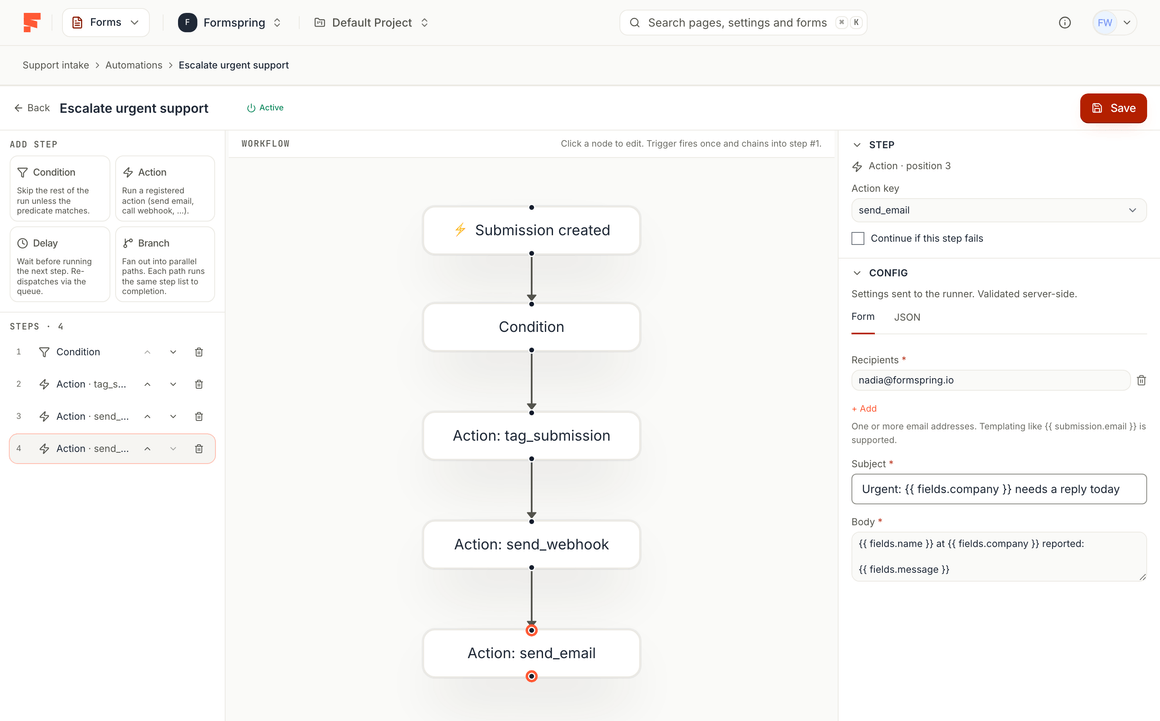
Automations at a glance
- What it is
- No-code workflows with triggers, conditions and actions that run after a submission, booking or other Formspring event, with a run history you can replay.
- Who it is for
- Teams that copy leads between tools or chase follow-ups by hand.
- What it replaces
- Manual follow-up and copy-paste between inboxes, spreadsheets and chat.
- Key limits
- The Free plan runs 100 automation runs a month and one active automation per form, survey, funnel or booking page. Paid plans lift that cap.
- Price
- Included on every plan. Pro is $19/mo without a monthly run cap. See pricing
- Where your data lives
- Submissions and uploaded files are stored in Germany. Email, push notifications, AI features and connected services may process data elsewhere. See the data flow
- Setup time
- A few minutes for one trigger and one action; longer for branching workflows.
- How to migrate
- Automations are built from Formspring's own triggers, so there is nothing to import from another automation tool.
- When another tool fits better
- An automation reacts to an event in Formspring. For workflows that start in other apps, a general-purpose automation tool fits better.
What you get.
Formspring Automations is the no-code layer that runs after every touchpoint: triggers, conditions, actions, history, and replay across forms, surveys, funnels, and bookings.
- Visual builder
- Wire triggers, conditions, and actions without leaving the dashboard.
- Cross-product
- One rule system for forms, surveys, funnels, and booking pages.
- Integrations
- Slack, email, webhooks, and connected tools as actions.
- Run history
- See what fired, what failed, and why.
- Replay
- Retry failed deliveries without re-submitting the original answer.
Automations is on every plan.
Build it. Share it. Watch it land.
- 1
Pick a trigger
New submission, score threshold, tag, or schedule.
- 2
Add conditions
Only run when the answer matches your rules.
- 3
Fire actions
Notify, update, integrate, or delay the next step.
About Automations
What are Formspring Automations?
No-code workflows that run after a form, survey, or funnel submission, or after a booking is confirmed, cancelled, or rescheduled.
How many automations can I run?
Free includes one active automation per target. Paid plans lift that cap.
What starts an automation?
A new clean submission, a change to one, a tag, a spam mark or a star, a schedule, a manual run, or a webhook delivery that fails after its retries. Bookings can start one too.
What can an automation do?
Send an email or a signed webhook, tag a submission or set its status, update a field, call another service, classify with AI where your plan includes it, or post to a built-in integration such as Slack.
What happens when a step fails?
The run stops unless that step is set to continue. The run stays in the history, and you can replay it after you fix the problem.
Put Automations to work this week.
Automations is on every plan.
When Automations is the right tool.
- A new lead should reach the right person without anyone copying it over.
- A booking was cancelled and the team should hear about it.
- A weekly digest should go out without someone remembering.
What to know first.
Limits stated plainly, so you can decide before you build.
- The Free plan runs one active automation per form, survey or funnel; paid plans lift that cap.
- An automation reacts to an event in Formspring. It is not a general workflow tool for other apps.
- A failed step stops the run unless that step is marked to continue, and the run stays in the history so it can be replayed.
Works with the rest of the workspace.
Set it up.
What to know about your data
Every run is logged
Each automation keeps a run history you can inspect and replay.
TroubleshootingStored in Germany
Submissions and uploaded files are stored in Germany. Email, push notifications, AI features and connected services may process data in other countries; the data flow shows where.
See the data flowEvery sub-processor named
Each provider that handles data is listed with its country and purpose.
Sub-processorsSigned data processing agreement
Available for paid plans.
Data processing agreement